Building Main Street, USA in a coffee table

[Alex George] has been collecting miniatures of Main Street, USA in Disney Land hand crafted by artist [Robert Olszewski]. These models are incredibly accurate, but sadly static. [Alex] has some of the floats from the Main Street Electrical Parade that light up with the help of a few LEDs. One day, [Alex] found himself wishing he could watch a miniature parade circling around his diorama and did what any of us would do: make a tiny electrical parade move around his miniature town.

[Alex] began his build by designing a system of chains and sprockets underneath his miniature Main Street. When not on display, the parade floats are hidden underneath the town. At night, though, the parade ascends to the surface to put on a show.

It’s not an electrical parade if there aren’t any lights, so [Alex] grabbed a couple Blinkms to attach to the underside of each float. These are small programmable RGB LEDs that can repeat the same sequence of lights for the entire time the parade is visible. A very excellent job and a masterwork of craftsmanship for both [Alex] and [Robert Olszewski].

[Alex]’s ‘making of’ video and a full demo of the float are available after the break.

via boingboing

[Read more…]

Two saxophone synthesizer builds for the price of one

[Bruce Land] has been sending in student projects from the electronic design course he taught at Cornell last semester. By a curious coincidence, two groups build saxophone synthesizers with the same key arrangement as a real sax.

First up is [Brian Wang]’s digital sax. There’s a small microphone in the mouthpiece and a series of buttons down the body of the sax telling the ATMega664 what note to play. The data for the saxophone synthesis was created by looking at a frequency plot of a sax, bassoon, harp, and pipe organ. [Brian] has the synthesis part down pat; there’s definitely a baritone sax in that little microcontroller.

Next up is [Suryansh] and [Chris]’s PVC pipe saxophone. It’s the same general principle as [Brian]’s project – the musician blows into the sax (we really like the kazoo mouthpiece) and a small mic picks up the sound of the wind. If the microphone output is above a certain threshold, the buttons are read and a note come out of the sax. We’re picking up a whiff of alto sax here; shame there wasn’t a duet with the two teams.

After the break you can see both saxophone projects in all their glory.

[Read more…]

Turning anything into a touch sensor

This year at the CHI conference in Austin, [Munehiko Sato], [Ivan Poupyrev], and [Chris Harrison] out of the Disney research lab in Pittsburgh demonstrated their way to make touch sensors out of anything. Not only to they suggest using the surface of your skin to control cell phones and MP3 players, they’re also able to recognize touch gestures, like poking or grasping an object. That sounds a little heady, so check out the video of the Touché tech in action.

Like the capacitive touch sensors in our phones and tablets, Touché measures the rise and fall of a capacitor’s charge over time. Unlike  other touch sensors, Touché scans the capacitor at different rates, allowing for a ‘capacitive profile’ that is used to recognized touch gestures.

The applications for this tech are nearly innumerable; the team demonstrated scolding someone for eating cereal with chopsticks (yeah, we know…), an on-body music player interface, and gestures for an office doorknob that notifies passersby if you’ve stepped out for a minute or are gone for the day.

It’s a very interesting build, and we give it two weeks until someone replicates this build. We’ll be sure to post it then.

[Read more…]

Build an 8-bit TTL computer

Very rarely do we see an Instructable so complete, and so informative, that it’s a paragon of tutorials that all Instructables should aspire to. [8 Bit Spaghetti]’s How to Build an 8-bit computer is one of those tutorials.

[8 Bit Spaghetti]’s build began on his blog. He originally planned to build a 4-bit computer but decided a computer that could only count to 15 would be too limiting. The build continued by programming an NVRAM as the ROM on a breadboard and finally testing his bundle of wires.

What really makes [8 Bit Spaghetti]’s special is the Instructable – he covers just about all the background information like the definition of a Turing machine, a brief introduction to electronics and logic chips, and binary numbers. Even though he’s doing some fairly complicated work, [8 Bit Spaghetti]’s tutorial makes everything very clear.

The computer isn’t quite done yet – there’s still a few nixie tubes to add – but we couldn’t imagine a better project for the budding electronic hacker.

Automatic cat feeder made with recycled laminator parts

automatic-cat-feeder

When [Antoine] and his family leave home for a few days, they usually have to find a neighbor who is willing to care for their cats while they are away. Instead of bothering the people who live next door, he decided it would be best to build an automatic cat feeder (Translation) instead.

[Antoine] originally tried building an auger to distribute the food, but it didn’t work as well as he had hoped. He opted to build a dispenser out of wood instead, driving the feeding wheel with an old microwave platter motor. The motor did not have enough torque to do the job, so he dismantled an old laminator, which had a more suitable motor inside.

He built a large hopper (Translation) out of wood and left over acrylic sheeting, which stores the cat food and houses all of the electronics used in the feeder. He controls the amount of food and feeding intervals using a pair of buttons and a small LCD display, all of which are controlled by an Arduino Nano.

While [Antoine] has not yet shared the source code that drives the feeder, he does have a demo video which you can watch below.

[Read more…]

Using Arduino shields with the Raspberry Pi

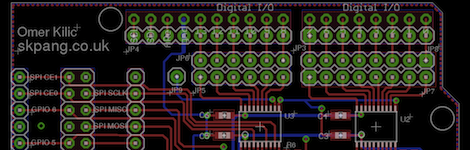
Since the Arduino was launched years ago, many ‘shields’ or add-on boards providing additional functionality have been released. There are hundreds of different shields, from video capture shields to touch screen shields. Now that the Raspberry Pi is out in the wild, it was only a matter of time before a RasPi to Arduino shield bridge was created.

[Omer] calls his bridge ‘Ponte’ and it allows Arduino shields to be used with the incredible  horsepower of an embedded Linux system. While [Omer] originally expected to write the RasPi to Arduino software converter himself, but found WiringPi halfway through the build. Of course this build comes just a day after we saw a tutorial on controlling the GPIO pins on the RasPi, and we expect to see similar GPIO-hacking builds in the future.

Right now, the Ponte only supports Arduino Uno-sized shield, so the possibility of an all-in-one RepRap controller using the RAMPS motor driver is impossible for now. We expect that to change very quickly as more people get their RasPis delivered.