QArt codes, the better way to put picture in a QR code

[Russ Cox], current Googler and formerly of Bell Labs, posted an awesome guide to putting images in a QR code. Unlike this terrible attempt I wrote last August, [Russ]’s method does much more than simply paste an image into a QR code and hope the error correction passes. This new method generates a unique URL to be encoded for each QR code. In other words, the embedded image is actually part of the QR code and not just a copy and paste attempt.

The basis of [Russ]’ hack is the ability to change the message contained in a QR code to be made of either ASCII/UTF-8 or decimal numbers coded as binary. By appending an anchor tag (i.e. http://swtch.com/pjw/#123456789...) to the URL that will be encoded, [Russ] can change a whole bunch of pixels in a QR code to make just about any image.

With a few tricks like building new Reed-Solomon encoded blocks, [Russ] can change where in the pixels required by the QR code are placed. This allows for the full-width image of PJW’s binary likeness to be displayed in the QR code.

[Russ] put up a QArt coder that allows anyone to put a pixelated image in any QR code. [Luke Shumaker] (thanks for sending this in, [Luke]) took this tool and put the ‘ol skull ‘n wrenches inside a QR code pointing to hackaday.com. Very nice work from [Russ], and puts my work to shame. I’ll go cry in a corner now.

This LED table really ties the room together

led-matrix-table

Along with quadrotors, and portable game consoles, one of the hacks we never get tired of seeing is an LED matrix table. [Christian Enchelmaier] wrote in to share his take on the ever popular pixelated furniture, which we think came out pretty well (Translation).

Instead of going for a full-sized coffee table, [Christian] decided to keep things on the smaller scale his first time out, opting for an ottoman/end table nstead. He constructed a 16×16 matrix using RGB LEDs, encapsulating each one in its own “pixel”, as is common with these builds. [Christian] uses an Atmega 128 to run the show, displaying the current time and date, temperature, music visualizations, games, images, along with short videos. He also outfitted the table with an IR receiver so that he can control the table’s display from afar.

As of right now, [Christian] doesn’t have any video of the table in action, but there’s plenty in the way of pictures scattered throughout his build log to keep you busy in the meantime.

Autonomous time lapse with a video camera throwie

When [Matt] came across a small video camera made to fit onto a keychain, the first thing that came to mind is a time-lapse video throwie. Like the LED + coin cell battery + magnet we’ve seen we’ve seen before (and deployed…), [Matt]’s video throwie would be deployed in interesting spots for a few days and shoot a time-lapse video until the battery ran out.

The camera [Matt] picked up has the capability of shooting video or still pictures and writing them to a microSD card. To make his camera film a time-lapse video, [Matt] connected an ATtiny45 to the camera shutter and power buttons and uploaded a short bit of code that would snap a picture ever 15 seconds.

Right now, [Matt] is having a few problems with his video throwie. When the camera is turned on, it iterates through the SD card to find the next unused file name. This eats up a few seconds, so the current setup will slowly speed up the time-lapse video. This isn’t an insurmountable problem, so we’re looking forward to the very interesting videos these tough little cameras will film.

Check out [Matt]’s video of ice melting after the break.

[Read more…]

Open sourcing everything… there's an app for that

What happens if you’re a prolific developer and decide to release all of the source code from your work? Well, you should get a huge pat on the back from all interested parties. And so we say thank you to [Hunter Davis] for releasing the source code for his 70+ Android apps. But just making the decision isn’t the end of things, you’ve got actually get the code out there. And herein lies the hack. Instead of archiving and posting all of those projects he wrote a script to crawl, init, and push his projects to Github automatically.

This process is made pretty easy because of the Github API. Looks like he used version 2 for his script but you’ll want to check out version 3 if you’re looking to write your own script. His script takes the API key and username as command line arguments, then traverses his local source tree. Along the way it uses some text manipulation to sanitize the directories for use as the name of the repository. Once that’s established it steps into the directory, creates a repository, adds and commits all the files, then pushes them to Github.

Following [Hunter’s] example makes it really easy to share your code. We hope more will follow suit, putting their work out there for others to learn from and build upon.

We’ve seen some hardware hacks from [Hunter] as well. He did a bunch involving the ZipIt, as well as some work with playing games with a Dockstar.

[via Reddit]

Conway's Game of Life in HD

We’re going to have to take [Mike’s] word for it that he built Conway’s Game of Life with high-definition video output. That’s because this screenshot is his only proof and it looks a bit fuzzy to us. But we are interested in the project which used an FPGA to generate a 1080p VGA output of the classic programming challenge.

One of the biggest benefits of using an FPGA for this application is the hardware’s parallel processing ability. For every frame of the game, the area around each living cell must be analyzed to produce the next evolutionary step. Most of the time this means processing all of the pixels in the playing area, which is the case here. [Mike] is using VHDL to program a Papilio Plus which has a Spartan 6 chip on it. He separated his code into the different components when writing about it. This makes it easy to find the chunks relating to the game if that’s what you’re interested in. If you just want to see how he implemented the VGA interface that’s well documented as well.

If you’re not familiar, Conway’s Game of Life has simple rules regarding when a cell will live, die, or be reborn. As [Mike] points out, every programmer should give it a shot at some point. We’ve seen many iterations from the very large to the very small.

Poking at the femtocell hardware in an AT&T Microcell

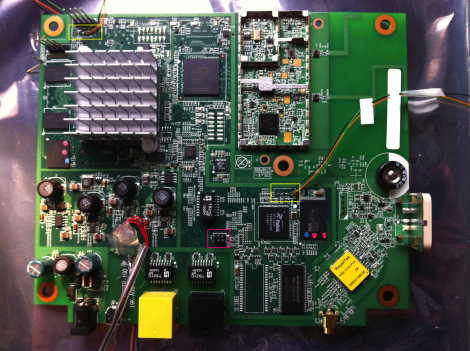
Here’s a picture of the internals of an AT&T Microcell. This hardware extends the cellular network by acting as its own cell tower and connecting to the network via a broadband connection. So if you don’t get service in your home, you can get one of these and hook it up to your cable modem or DSL and poof, you’re cellphone works again. [C1de0x] decided to crack one open and see what secrets it holds.

On the board there are two System-0n-Chips, an FPGA, the radio chip, and a GPS module. There is some tamper detection circuitry which [C1de0x] got around, but he’s saving that info for a future post. In poking and prodding at the hardware he found the UART connections which let him tap into each of the SoCs which dump data as they boot. It’s running a Linux kernel with BusyBox and there are SSH and ROOT accounts which share the same password. About five days of automated cracking and the password was discovered.

But things really start to get interesting when he stumbles upon something he calls the “wizard”. It’s a backdoor which allow full access to the device. Now it looks like the developers must have missed something, because this is just sitting out there on the WAN waiting for someone to monkey with it. Responses are sent to a hard-coded IP address, but a bit of work with the iptables will fix that. Wondering what kind of mischief can be caused by this security flaw? Take a look at the Vodafone femtocell hacking to find out.