Auto power circuit for an arcade machine

Some of the pinball machines which [Jeri Ellsworth] has restored have ended up in the break room at her work. We’re sure her coworkers are thankful for this, but sometimes they forget to turn off the power to the machines, and letting them run constantly means more frequent servicing will be necessary. She set out to fix the situation by building a circuit that will automatically power the machines.

We think the solution adds some much needed functionality. Instead of hunting for the power switch, you can now power the machine up by hitting the left flipper, and it will automatically shut off after about five minutes of not having that flipper button pressed. For this she grabbed a 555 timer chip and built a circuit to control the relay switching the mains power.

She added a magnet and reed switch to the left flipper switch assembly to control her add-on circuit. It connects to the base of a PNP transistor which controls a resistor network and capacitor. This part of the circuit (seen to the left of the 555 in the schematic) allows the timer to be re-triggered. That is, every time you press the flipper the 555 will reset the timer. Don’t miss the demo she filmed after the break.
[Read more…]

Klackerlaken gets the common man excited about electronics

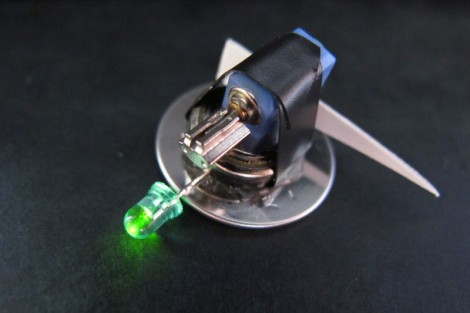
The Klackerlaken is a combination of LED throwie and bristlebot. The bauble is easy to build and really has no other purpose than to delight the masses. The diminutive devices were first seen in the wild at the 2011 CCC (Chaos Communications Camp) as a hands-on workshop. Check out the clip after the break and you’ll see why this really sucks in the spectators.

We’ve seen a ton of Bristlebots before (this tiny steerable version is one of our favorites) and were intrigued to see bottle caps used as the feet instead of the traditional toothbrush head. In fact, that video clip shows off several different iterations including two caps acting as an enclosure for the button cell and vibrating motor. Googly eyes on the top really complete the look on that one.

Decorating the robots with LEDs, fake eyes, tails, and feathers helps to temper the technical aspects that kids are learning as they put together one of their own. We’re glad that [Martin] shared the link at the top which covers the creations seen at a workshop held by Dorkbot Berlin. This would be a great activity for your Hackerspace’s next open house! Perhaps its possible to have follow-up classes that improve on the design, using rechargeable cells instead of disposable buttons, or maybe supercaps would work.

[Read more…]

A one-bit processor

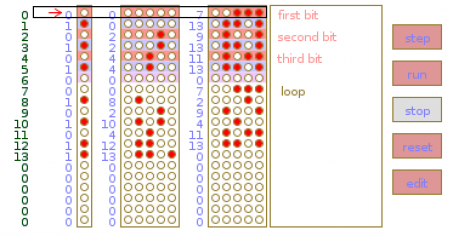
Put on that abstract thinking cap, get out the pen and paper, and spend some time figuring out how this one-bit processor works. [Strawdog] came up with the concept one day during his commute to work (don’t worry, he takes the train… much safer than [Dave Jones’] frightening drive-time podcasts). He sketched it out on paper to make sure he knew where he was going with the project, then collaborated with Legion Labs to implement it in processing as an easier way to visualize its functionality. Since it’s one-bit there’s only room for one instruction. That instruction is a copy, then branch-if instruction. It copies the current bit to one address, and if that bit was one, it branches to a second address.

Going a bit fast for you? We think the description is fairly good, but if you can’t quite put it together from the article’s description, you may want to build this 2-bit paper processor and learn how it works first. It should teach you the basic concepts you need to understand the 1-bit version. As you can see in the image above, there’s also a single-step feature in the processing example that lets you analyze the effects of each instruction during program execution.

Rolling digit clock is a wonderful piece of engineering

A long time ago and on a scrounging trip he barely remembers, [Victor] bought a quartet of digits from an old Dutch Railways clock. These antique displays used a strip of plastic coated cloth that rolls around itself with the help of a motor to display the digits 0 through 9. It’s been many years, but [Victor] finally got around to building a clock out of these single digit displays and we’re loving the results.

Because these displays were manufactured in a time when mechanical devices were king, [Victor] had to slightly modify each digit so they could display numbers with the help of a continuous rotation servo. The four servos are controlled by an Arduino – each digit changing one at a time to reduce current consumption – and a magnet and reed switch was added to each digit so the numbers could be repeatedly displayed.

Before [Victor] replaced the plastic servo gears with metal cogs, the clock was quite noisy. He’s since put each digit underneath a bell jar (actually a vase turned upside down), and we’ve got to say that [Victor] has a nice clock on his hands. Check out the videos of the clock changing digits to display the time after the break.

[Read more…]

Microsoft shows off their transparent 3D desktop prototype

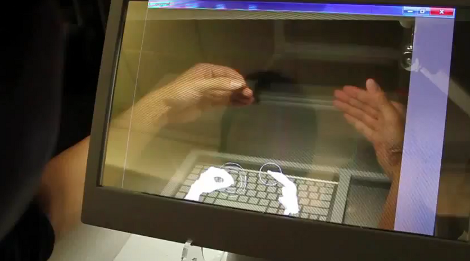
We think most would agree that the Microsoft Kinect is a miraculous piece of hardware. The affordable availability of a high-quality depth camera was the genesis of a myriad of hacks. And now it seems that type of data is making an intriguing 3D display possible.

What you see above is a 3D monitor concept that Microsoft developed. It starts off looking much like a tablet PC, but the screen can be lifted up toward the user whose arms reach around it to get at the keyboard underneath. There is as depth camera that can see the hands and fingers of the user to allow manipulation of the virtual environment. But that’s only part of the problem. You need some way to align the user’s eyes with what’s on the screen. They seem to have solved that problem too, using another depth camera to track the location of the user’s head. This means that you can lean from one side to the other and the perspective of the virtual 3D desktop will change to preserve the apparent distance of each object.

Don’t miss the show-and-tell video after the break. As long as there’s only one viewer this looks like a perfect non-glasses alternative to current 3D hardware offerings. [Read more…]

Billiards concepts plied to position acoustic panels

If you know your way around a pool table you should be able to apply those skills to improving the sound of your home theater. [Eric Wolfram] put together a post that discusses the issues caused by unwanted sound reflections and shows how to position acoustic tiles to solve the problem.

This is a companion post to his guide on building your own acoustic tiles. Don’t worry if you haven’t gotten around to doing that yet. With just a wood frame, dense fiberglass, and some fabric they’re simple to build. They’re also easy to hang but until now you might have just guessed on where they should go.

Once you have all of your speakers and seats in position grab a mirror and some post-it notes. Take a seat as the viewer and have a friend operate the mirror as seen above. With it flat against the wall, mark each spot with a sticky-note where you can see a reflection of one of the speakers. Finding the reflection points is just like lining up a bank shot in Billiards. With five speakers (5.1 Surround Sound) and six surfaces (walls, ceiling, and floor) you should be able to mark 30 reflections points. Now decide how wild you plan to go with the project. The best result will address all 30 reflection points, but you can get by with just the front marks if you’re a bit more conservative.